Blog Scheduling for Rental Hosts: 7 Ways to Publish Weekly
Blog scheduling is the practice of setting a fixed weekly publish day and time, then queuing finished posts in advance so they go live without you. For a rental host, the simplest workable setup is one post per week, drafted in a batch, reviewed once, and published automatically.
Key Takeaways
- One post per week is the cadence we recommend for blog scheduling on a vacation rental site; publishing every two weeks or monthly is sustainable if weekly is unrealistic, and consistency matters more than volume.
- A content calendar maps topics to publish dates. Seasonal guides should go live well before the travel window: coastal packing guides in March, mountain fall itineraries by August, urban holiday roundups six to eight weeks ahead.
- WordPress lets you schedule a post by choosing a future date and time in the editor. Google Docs works for drafting but cannot publish to your own domain.
- Writing one quality post by hand takes 3 to 5 hours, and a freelance travel writer charges $300 to $700 per post. A single direct booking is typically worth $1,000 to $4,000, while Airbnb host and guest fees combined take 17 to 19% of every booking.
- inkSTR generates, schedules, and publishes SEO articles automatically on a set schedule for $99 per month, so your blog keeps publishing while you run your rentals.
Most hosts we talk to do not have a writing problem. They have a consistency problem. A burst of three posts in January, silence until June, then a guilty rewrite of the About page. Search engines reward sites that show up on a predictable rhythm, and a schedule creates exactly that.
In 2026, blog scheduling also feeds AI search. Answer engines pull from sites that publish steadily and cover a topic in depth. At inkSTR, we built our pipeline around that fact, and the seven steps below show how to set up a weekly system that fits around check-ins, turnovers, and guest messages.
1. How Often Should You Post on a Blog?
The right posting frequency for a vacation rental blog is one post per week. That pace builds topical depth around your market, and a solo host can sustain it. Every two weeks or monthly also works if time is tight. Long gaps do not.
Here is the trap. You write four posts in a motivated weekend, each taking 3 to 5 hours, then a fully booked summer eats your calendar and the blog goes quiet for five months. Hiring a freelance travel writer at $300 to $700 per post fixes the time problem and creates a budget problem.
We built inkSTR's Content Calendar around this exact failure. You set the cadence once, and articles are generated, scheduled, and published on that rhythm. One honest caveat: a weekly cadence only compounds when each post targets a real guest search, so we pair it with Keyword Research instead of guessing topics.
Matching topics to guest questions is the part that decides whether a post earns traffic. Start with your inbox. Pull the questions guests asked before booking and during their stay: where to park a trailer, whether the hot tub runs in winter, which trailhead is least crowded at sunrise. Each recurring question is a post, and it ranks because real people already type it. A cabin near Gatlinburg might get asked about the drive in snow; a condo in Destin might get asked about beach wheelchair rentals. Write those first. Generic posts like "top 10 things to do" compete with every travel site, while a question only your property can answer faces far less competition.

2. What Is a Blog Content Calendar and How Does It Work?
A blog content calendar is a dated plan that assigns each article a topic, a target keyword, and a publish slot. It turns "write something someday" into "this post goes live Tuesday at 10:00," which exposes gaps weeks before they cost you traffic.
Without one, you end up with a spreadsheet nobody opens, sticky notes with half-ideas, and two posts on nearly the same topic. Your fall foliage guide might have no slot at all until the leaves are already turning.
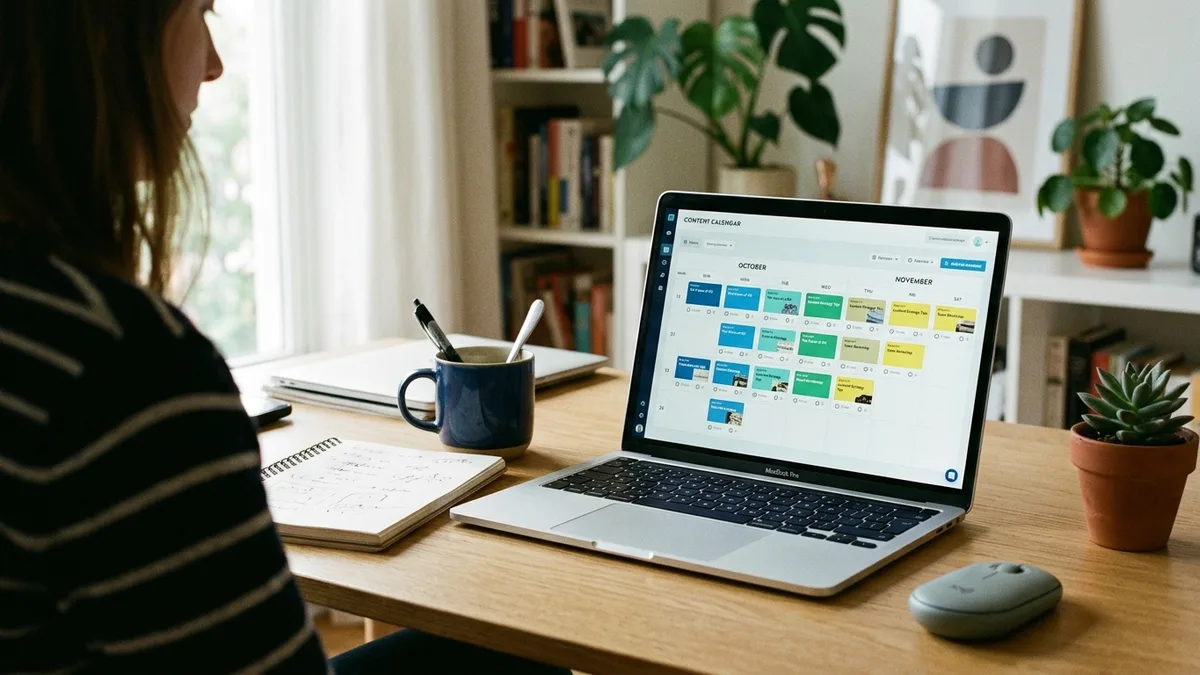
Our drag-and-drop calendar shows every scheduled article across the coming weeks. Need to move a post because a topic became timely? Drag it to a new date. We designed it for hosts who check in for ten minutes on Monday, not marketers who live in dashboards. For ideas to fill the slots, our guide to vacation rental blog topics that drive bookings is a good starting list.
3. Can You Schedule a Blog Post in WordPress?
Yes. WordPress lets you schedule a post by changing its publish setting from immediate to a future date and time, after which the button reads Schedule instead of Publish. The post then goes live automatically at that moment.
- Open your finished draft in the post editor.
- Open the publish settings and click the date field.
- Choose the day and time, such as Tuesday at 10:00.
- Click Schedule and confirm the post shows a scheduled status.
The mechanics are simple. You still write, format, add images, and set the date for every post by hand. WordPress also runs scheduled posts through a built-in task runner that can occasionally miss a slot, and nobody tells you until a week has passed.
That is why we built Auto-Publishing. inkSTR publishes directly to WordPress or Wix without the copy, paste, and date-picking routine, and one schedule covers both platforms.
4. How to Create a Blog on Google Docs, and Should You Draft There?
Creating a blog in Google Docs means using a Google Doc as your drafting workspace. Google Docs cannot host or publish a blog on your own domain, so every finished draft still has to be moved into WordPress or Wix before readers can see it.
That move is where time disappears. Headings lose their formatting, images need re-uploading, internal links get re-added by hand, and three versions of the same post pile up in a folder named "final." Docs works fine for jotting down property facts and local details you want in future posts.
For the actual article, our AI Content Writer produces a full SEO-optimized draft from keyword research, so there is no paste step. Keep your Google Doc as a notes file of what only you know: the trailhead locals prefer, the quirks of your hot tub, the question every guest asks at check-in.
5. What Are Good Scheduling Tools for Social Media and Blog Posts?
Social media scheduling tools queue posts to channels like Facebook and Instagram, while blog scheduling software queues articles to your own website. A small rental business eventually needs both, but the blog side is where direct bookings are built, because those pages rank in search for years.
| Option | What it schedules | Writes the article? | Cost |
|---|---|---|---|
| Built-in CMS scheduler (WordPress, Wix) | Posts you already wrote | No | Included with your site plan |
| Scheduling plugin | Posts, with a calendar view | No | Varies by plan |
| Social media scheduler | Social posts that link back to your blog | No | Varies by plan |
| inkSTR | Generates, schedules, and publishes articles | Yes | $99 per month |
Operators typically juggle three to five software tools already. A separate writer, scheduler, and social tool adds more logins and more places for a post to stall. We wrote about the wider stack in must-have tools for short-term rental managers.
Where inkSTR fits: it covers writing, scheduling, and publishing in one place. See the pricing page for plan details. A social scheduler is a reasonable add-on once the blog is running, because you then have fresh articles worth sharing.

6. How Do You Plan Blog Scheduling Around Seasons?
Seasonal blog scheduling means publishing each guide weeks or months before guests start planning that trip, because search interest builds ahead of travel dates. A fall foliage itinerary published in October arrives after your guests have already booked somewhere else.
| Market type | Example post | When to publish |
|---|---|---|
| Coastal | Beach packing guide | March, not July |
| Mountain cabin | Fall foliage itinerary | Live by August |
| Urban apartment | Holiday event roundup | Six to eight weeks before the dates covered |
Most hosts notice peak season is two weeks away and scramble. The post gets written in a hurry, with vague claims about local events that nobody verified.
Work backward instead. Mark your booking windows on the calendar, subtract the lead time above, and slot the post there. Ground each article in what you know firsthand about your property and area, and skip anything you cannot confirm. Keyword Research inside inkSTR shows which seasonal questions guests are typing, so the calendar fills with topics that have real search demand.
Ready to automate your content marketing?
inkSTR handles keyword research, content strategy, article writing, and publishing, all on autopilot.
7. What Happens When a Scheduled Post Gets Missed?
A missed scheduled post is an article queued for a specific date and time that never went live, usually because of a failed task runner, a disconnected integration, or an expired login. Most guides skip this scenario, yet it is the most common reason a blog quietly stalls.
Picture a turnover day followed by a family trip, and the Tuesday post silently failed. You notice ten days later when you finally open the dashboard. One missed slot becomes three, and the habit breaks.
- Keep one finished buffer post in reserve so a failure never leaves a gap.
- Check your calendar for 10 minutes every Monday to confirm that last week's post is live.
- Reconnect your site integration once a month, before a login expires on its own.
- Name one backup person who can publish a post if you are away.
We treat publishing as a pipeline instead of a task. inkSTR runs generation, quality scoring, pre-publish validation, and publishing as connected steps, so a Monday glance at the calendar tells you what is live and what is next.
What Does a Weekly Blog Scheduling Plan Look Like for a Busy Host?
A workable weekly blog scheduling plan takes about 15 minutes of your attention: one review session, one fixed publish slot, and one performance check. Everything else runs on its own. Tuesday morning is a common publish slot, though the exact day matters less than keeping it the same.
The alternative is the all-nighter before a deadline you set yourself. Batching a month of posts on a Sunday feels productive until review fatigue sets in and you stop reading what you approve.
- Monday: open the calendar, confirm last week's post is live, and read this week's post once for accuracy.
- Tuesday, 10:00: the post publishes automatically.
- Thursday: share the new article to your social channels if you use them.
- Friday: glance at Google Analytics and Search Console to see which posts draw visits.
Scheduling in advance frees your blog from your mood and your occupancy. Search engines see a steady rhythm, readers learn when to expect new content, and you stop carrying a mental to-do item every week. Our How inkSTR Works page walks through the full flow from keyword to published post. To keep the voice yours, read our guide to article automation without losing your brand voice.

Does Blog Scheduling Pay Off in Direct Bookings?
Blog scheduling pays off when steady publishing compounds into search rankings and those rankings turn into commission-free reservations. A single direct booking is typically worth $1,000 to $4,000, and a ranking article can keep driving organic traffic for 2 to 5 years.
Compare that to the status quo. Every booking that routes through Airbnb costs 17 to 19% in combined host and guest fees, and a sporadic blog never builds enough authority to change that. You keep paying the platform for guests your own site should be winning.
Here is what consistent publishing looked like for two inkSTR customers. A Smoky Mountains cabin brand grew monthly Google Search clicks from 788 to 5,195 in 11 months and attributed $309,775 in direct booking revenue over its first 14 months. A five-market mountain rental brand published 114 articles in four months and moved from 26 to 1,924 monthly Google search visits. Both were measured in Google Search Console and site analytics.
As of October 2026, we have published more than 4,800 articles across inkSTR customer sites. Results vary by market and competition, and ranking typically takes consistent publishing over several months. That is the reason automation matters. See how this connects to your direct booking strategy, and why blog content sometimes fails to convert visitors into guests if yours is not performing.
Frequently Asked Questions
What software helps with blog publishing, SEO recommendations, and website analytics?
Most hosts piece together a CMS such as WordPress or Wix, a keyword tool, and Google Analytics with Search Console. inkSTR combines keyword research, article writing, scheduling, and publishing in one platform, and it connects to Google Search Console for performance data. You still use your site analytics to see which posts bring visitors.
How do you use AI tools to write blog articles for a rental business?
Start with the keywords your guests search, then have the AI draft a full article around each one. Review it for accuracy, add details only you know, and schedule it. inkSTR's AI Content Writer generates drafts built for vacation rental terminology and traveler search intent.
What vendors offer automated blog content generation for large portals?
Tools vary in what they generate: listing descriptions, general marketing copy, or full blog articles. inkSTR focuses on SEO and AI-search-optimized blog articles for short-term rental sites and runs separate content pipelines for each property or brand from one dashboard. Check what any vendor actually produces before you commit.
How much does blog scheduling software cost per month?
Scheduling a finished post is built into WordPress and Wix at no extra charge. Plugins and social schedulers vary by plan. inkSTR starts at $99 per month and covers writing as well as scheduling and publishing, so you do not pay separately for a writer.
What are the benefits of scheduling blog posts in advance?
Scheduling keeps your publishing rhythm steady during busy seasons, lets you time seasonal guides weeks ahead of guest planning, and removes the weekly decision about whether to write. It also reduces last-minute rushed posts that contain unchecked details.
What day and time should I publish my blog?
Pick one fixed slot and keep it. Common examples are Tuesday and Thursday mornings or afternoons, with a lighter bonus post on Saturday morning. Consistency matters more than the exact hour, since the goal is a predictable rhythm for both readers and search engines.
How long does it take for a scheduled blog to produce direct bookings?
Most sites see meaningful traffic gains within three to six months of consistent publishing, though results depend on your market and competition. A ranking article can then keep sending visitors for 2 to 5 years. Nobody can guarantee a specific ranking or booking volume.
What Is the Simplest Way to Start Blog Scheduling This Week?
The simplest way to start blog scheduling is to choose one weekly publish slot, queue your first four posts, and keep a buffer post in reserve. Weekly consistency beats occasional bursts, and the 15-minute Monday review keeps quality in your hands while the pipeline handles the rest.
If keeping up with keyword research and publishing across your properties feels impossible right now, start a free trial with inkSTR and see your first content plan. We generate, schedule, and publish on autopilot, so your blog keeps working while you handle guests, anywhere in the U.S. You can also get started here.

Content powered by inkSTR.co
Enjoyed this article? Share it:
Get more of inkSTR in Google Search
Add inkstr.co as a preferred source and our articles show up more in Top Stories, AI Overviews, and AI Mode — with a “Preferred” badge.
Get more guides like this
New SEO and AI-search guides, straight to your inbox. No spam, unsubscribe anytime.