SEO Audit Examples for Vacation Rental Websites
SEO audit examples show how a reviewer checks a website for crawl, indexing, on-page, speed, and backlink problems, then ranks the fixes by business impact. For a vacation rental site, a good example groups findings by area, cites evidence for each issue, and ends with a short priority list tied to direct bookings.
Key Takeaways
- A usable SEO audit example has five parts: scope, evidence, findings by area, priority ranking, and a follow-up measurement plan.
- Technical checks cover robots.txt, noindex tags, canonicals, redirects, sitemaps, and Core Web Vitals thresholds of LCP 2.5 seconds, INP 200 milliseconds, and CLS 0.1.
- Sample reports often use fictional placeholder data, so you must replace every value with evidence from your own site before acting on it.
- Rank findings by booking impact and effort: a blocked property page outranks a missing alt tag.
- Modern audits also check whether AI crawlers can reach your pages, which most templates still skip.
- inkSTR turns audit findings into published fixes by generating keyword-targeted articles, scheduling them in a content calendar, and tracking results through Google Search Console.
At inkSTR, we build AI content tools for short-term rental operators, and the audit question we hear most is simple: my site looks fine, so why does nobody find it? A well-run audit answers that in an afternoon. In 2026 it needs to cover Google and AI search together.
This guide walks through the structure of a strong audit, the sections every example should contain, a worked illustrative scenario, and a repeatable process you can run quarterly. Every example here is labeled as illustrative. None of it is real client data.
You do not need to be technical. You need a crawler, Google Search Console, a spreadsheet, and the discipline to rank issues by what they cost you in bookings.

What Does an SEO Audit Include for a Vacation Rental Website?
An SEO audit is a structured review of a website's crawlability, indexing, on-page content, performance, and backlinks, documented with evidence and ranked by impact. For a vacation rental site, it also checks property pages and local signals. It looks at the path from blog content to your booking page too.
Most SEO audit examples you will find online follow a similar skeleton. They open with an executive summary and move through technical and on-page findings. They close with priority actions. Some add a scorecard, screenshots of each issue, and an off-page backlink section.
The sections to expect
- Crawlability and indexing: robots.txt, noindex directives, canonical tags, status codes, redirects, and XML sitemaps.
- On-page review: title tags, headings, internal links, duplicate content, and keyword targeting.
- Performance and mobile: page speed, Core Web Vitals, and mobile usability.
- Off-page and local: backlinks, structured data, and local search signals.
- Recommendations: each finding with severity, effort, and an owner.
The problem is time. Doing this by hand means crawling the site and exporting data. Then you cross-check Search Console and write the report. Many operators start and abandon the process halfway through because it competes with guest messages and turnovers.
We built inkSTR's brand audit and keyword research features so the competitor keyword gaps surface without a spreadsheet. You see which searches rivals rank for that you do not, which is the content half of any audit.
What Does a Good SEO Audit Example Look Like Section by Section?
A good SEO audit example presents each finding as a short record: what was found and where, plus the evidence. It also says why it matters and what fix is recommended. Reports that only list issues without evidence or priority are checklists, not audits. They rarely get acted on.
Here is an illustrative excerpt for a fictional lake house rental site. The values are placeholders, not real measurements.
| Area | Illustrative finding | Priority | Effort |
|---|---|---|---|
| Indexing | Property pages carry a noindex tag left over from site launch | Critical | Low |
| Performance | Mobile LCP on gallery pages exceeds the 2.5 second reference threshold | High | Medium |
| On-page | Several blog posts share identical title tags | Medium | Low |
| Content | No articles target weekend-getaway searches for the lake town | High | Medium |
| Off-page | Few local sites link to the domain | Medium | High |
Notice the first row. A leftover noindex tag can hide your most valuable pages from Google entirely, which is why indexing issues rank above everything else.
Skipping the written evidence is the mistake we see most. Without a screenshot or a crawl export, the finding turns into an opinion, and nobody fixes opinions.
Our AI Content Writer handles the content rows in a table like this one. When the audit shows a topic gap, you generate a 2,500 to 3,500 word article aimed at that gap instead of briefing a freelancer who typically charges $300 to $700 per post.
How Do You Run an SEO Audit for Your Vacation Rental Website?
You run an SEO audit by defining scope, crawling the site, validating findings in Google Search Console, ranking issues by impact, and scheduling fixes with a re-check date. The full process takes a focused afternoon for a small site and longer for a multi-property portfolio.
- Step 1: Define scope. List the page types you will inspect: homepage, property pages, blog posts, location pages, and booking pages. Sample two or three of each template rather than every URL.
- Step 2: Crawl the site. Run a crawler such as Screaming Frog to surface 404s, broken links, redirect chains, and slow pages.
- Step 3: Pull Search Console data. Open Google Search Console and check indexing status, queries, impressions, and clicks for each page type.
- Step 4: Test performance. Run key pages through PageSpeed Insights and compare against the LCP, INP, and CLS thresholds above.
- Step 5: Record evidence. Save a screenshot or export for every issue. No evidence, no finding.
- Step 6: Rank by impact and effort. Put blocked booking-relevant pages first, then performance failures, then minor enhancements.
- Step 7: Schedule fixes and a re-audit. Assign each fix a date and set a re-check after the next batch of changes.
Doing all seven steps manually is slow, and the content fixes are the slowest part. Writing one quality post by hand takes 3 to 5 hours of research and writing, so a list of ten topic gaps becomes weeks of work.
That is where the Content Calendar earns its place. Open it, drag each gap-filling article to a date, and the scheduler publishes to your site on that schedule. Our how it works page shows the full path from keyword to published post.
What Are the Main Technical Checks for Rental Websites?
Technical SEO checks verify that search engines and AI crawlers can reach and render your pages. They also verify that those crawlers can understand them. The core list covers robots.txt, noindex tags, canonicals, status codes, redirects, sitemaps, JavaScript rendering, structured data, and page experience metrics.
Crawl and index checks
Start with robots.txt and noindex directives, because they can block entire page types. Then confirm that canonical tags point where you expect and that your XML sitemap lists only live, indexable URLs. Redirect chains and soft 404s waste crawl effort on pages that do nothing for you.
Performance checks
The reference thresholds are LCP of 2.5 seconds, INP of 200 milliseconds, and CLS of 0.1. Vacation rental sites tend to fail on LCP because of large photo galleries, so compressed hero images and lazy-loaded galleries are the usual first fix.
Rendering and structure
Some website builders and booking widgets load content with JavaScript. If the property description only appears after scripts run, a crawler may see an empty page. Check the rendered HTML, not just what your browser shows.
The pain here is that none of this feels connected to bookings until a page quietly disappears from Google. Our Auto-Publishing feature sends articles straight to Wix or WordPress in a consistent format, which removes one common source of messy markup: manual copy-and-paste formatting.

How Do You Audit Local SEO for Vacation Rentals?
Local SEO auditing checks whether your site and profiles send consistent location signals for the markets you serve. For vacation rentals, that means location pages, property pages that name the town or neighborhood, a complete Google Business Profile where eligible, and content that matches how travelers search for the area.
Start with a simple test. Search the phrase a guest would type for your destination and note who ranks. If the results are all booking platforms and large management companies, your audit should look for the content types they publish that you do not.
Local checklist
- Does each property page name its town and nearby landmarks in the title, heading, and body?
- Do you have area guides that answer off-season and weekend searches, not only the peak-season ones?
- Is your name, address, and contact detail identical everywhere it appears?
- Does structured data describe the lodging and its location?
Honestly, a Google Business Profile can matter more than a blog for some map-style searches, so audit both. But a profile cannot answer a long question like where to stay for a fall foliage weekend. Only content can.
Our guide on local area guides that sell covers how to build those pages, and our piece on the local signals Google cares about in 2026 goes deeper on the signals themselves. inkSTR grounds each article in your real property details, so the location content reads as specific rather than generic.
Why Do Most SEO Audit Examples Fail Operators?
Most SEO audit examples fail operators because they are written for agencies reporting to clients, not for hosts deciding what to fix first. They use fictional data and skip prioritization. They also ignore the connection between rankings and direct bookings.
Placeholder data gets copied as fact
One widely shared sample describes a fictional company and fills in plausible-looking numbers. Treat every figure in a template as a placeholder. If a template says a site has a certain number of broken links, that is a format demonstration, not a benchmark for your site.
Issue lists with no ranking
A report with 99 checks and no priority order produces paralysis. Another sample flags thousands of filter URLs and soft 404s but treats them like any other line item. In practice, blocked commercial pages should outrank cosmetic enhancements every time. Failed Core Web Vitals should too.
No business link
An audit that never mentions bookings misses the point. A single direct vacation rental booking is typically worth $1,000 to $4,000 in revenue. Airbnb host and guest fees combined take 17 to 19 percent of every booking. Fixes should be ranked by how close they sit to that money.
We see operators lose weeks fixing minor tags while a content gap costs them every informational search in their market. inkSTR's Google Search Console integration tracks keywords and flags opportunities, so your priority list comes from live data rather than a stale PDF.
Ready to automate your content marketing?
inkSTR handles keyword research, content strategy, article writing, and publishing, all on autopilot.
Which Report Format Fits Which Audience?
The right audit report format depends on who reads it. Executives want a one-page summary and developers want URLs and evidence, while content teams want topic gaps and clients want plain-language impact. A single format rarely serves all four, so build layers into one document.
| Reader | What they need | Level of detail |
|---|---|---|
| Owner or executive | Top five issues, expected booking impact, next step | One page |
| Developer or web builder | Exact URLs, status codes, screenshots, fix instructions | Technical appendix |
| Content writer | Keyword gaps, thin pages, internal link targets | Topic list with intent notes |
| Property owner client | Plain-language summary and what changes for their listing | Short narrative |
If you manage properties for owners, the last row matters most. Owners rarely read crawl exports, but they read a short note that says which pages bring inquiries.
Managing this across a portfolio is its own burden. Multi-property operators juggle separate logins and calendars for each brand. Each brand has its own drafts too. inkSTR's multi-project support gives each property or brand an independent pipeline, so audit findings for one market turn into scheduled content for that market without touching the others.
What Do SEO Audits Miss About AI Search in 2026?
AI search auditing checks whether crawlers behind tools like ChatGPT and Perplexity can access your content, as well as Google AI Overviews. It also checks whether the content is structured to be quoted. Many audit templates still stop at traditional search, which leaves a visible gap in 2026.
Add these checks to your audit:
- Confirm robots.txt does not accidentally block AI crawlers you want to reach.
- Check that each article opens with a direct, quotable answer.
- Verify that question-format headings and FAQ blocks are present on key pages.
- Re-run the audit after every site release, since a redesign can silently change crawl rules.
This also answers a question we see in our own search data: what a GEO audit is. A GEO audit is the AI-search layer of an SEO audit. It checks crawler access and answer-first structure. Citation-friendly formatting gets a look too. To audit your site for GEO best practices, run the checklist above, then track whether impressions and citations improve after you apply the fixes.
Across inkSTR customer sites, we have secured more than 1,500 verified AI-search citations as of October 2026. We build every article with LLM citation optimization for exactly this reason. For a deeper look, read our guide on ranking in AI search.
How Do You Turn an Audit Into Results You Can Measure?
You turn an audit into results by assigning each fix an owner and date, shipping changes in small batches, and re-measuring in Google Search Console after Google has had time to recrawl. Treat the audit as the start of a loop, not a document you file away.
Set baselines before you change anything: clicks and impressions. Add indexed page count. Then compare after each batch. SEO is slow, so expect months rather than days before a new content effort shows steady traffic.
Here is what that looked like in one case. A Smoky Mountains cabin rental brand grew monthly Google Search clicks from 788 to 5,195 over 11 months using a continuous inkSTR content pipeline, measured in Google Search Console and Google Analytics. A five-market mountain rental brand went from 26 to 1,924 monthly Google search visits in four months after publishing 114 articles.
The manual alternative is hard to sustain. Auditing, writing, formatting, uploading, and re-checking every month is a part-time job. inkSTR costs $99 per month, and a ranking article can keep driving organic traffic for 2 to 5 years. See pricing for plan details.
To build the habit, pair your audit with a content plan. Our posts on how to rank your vacation rental website on Google and why a vacation rental website is not ranking cover the next steps. For the direct booking side, see our direct bookings page.
What Is the Quick-Reference Summary of the Audit Steps?
The audit steps in order are scope, crawl, Search Console review, performance test, evidence capture, impact ranking, and scheduled re-check. Run the cycle quarterly, and again after any major site change or redesign.
- Define which page types you will sample.
- Crawl and export issues.
- Validate with Google Search Console.
- Test Core Web Vitals against 2.5 seconds, 200 milliseconds, and 0.1.
- Save evidence for every finding.
- Rank by booking impact, then effort.
- Fix, re-measure, and repeat.
Common mistakes: reusing template numbers as facts, skipping prioritization, auditing once and never again, and ignoring AI crawler access. Estimated time: a focused afternoon for a single-property site; longer for a portfolio.
Frequently Asked Questions
What is a GEO audit?
A GEO audit reviews whether your website can be found and quoted by AI search tools such as ChatGPT and Perplexity. Google AI Overviews is part of that review. It checks crawler access and answer-first page structure. It also checks question-format headings and FAQ blocks. It works best as an added layer on top of a standard SEO audit.
How do I audit my website for GEO best practices?
Confirm your robots.txt does not block AI crawlers, then check that key pages open with a direct answer and use question-based headings. Add FAQ sections and clear entity names such as platforms and places. inkSTR writes each article with these citation signals built in.
How do I conduct a GEO audit step by step?
List your key pages, check crawler access, review each page for a quotable opening answer, and confirm structured headings. Then record your baseline impressions in Google Search Console and re-check after changes. Repeat quarterly.
Can I track improvement after implementing audit recommendations?
Yes. Record clicks and impressions before you change anything. Note indexed pages as well, then compare after each batch of fixes. Google Search Console is the main source, and inkSTR's Search Console integration tracks keywords and flags opportunities so you can see movement over time.
What does a site audit actually check?
A site audit checks crawlability, indexing, redirects, page speed, on-page elements like titles and headings, internal links, structured data, and backlinks. A GEO-focused audit adds AI crawler access and answer-first content structure.
What is the best SEO audit tool for vacation rental operators?
A desktop crawler plus Google Search Console and PageSpeed Insights covers most of a technical audit at low cost. For the content side, inkSTR's brand audit shows competitor keyword gaps specific to short-term rentals. Its keyword research does the same.
How often should I run an SEO audit?
Run a full audit quarterly and a quick re-check after any redesign, platform migration, or large content push. Small sites can keep each pass short by sampling a few pages from each template.
Can I use a sample SEO audit report as my own?
Use it as a format, never as data. Sample reports often describe fictional companies with placeholder values. Replace every figure with evidence from your own crawl and Search Console before acting on it.
What Should You Do After Reading These SEO Audit Examples?
The best SEO audit examples share one habit: they rank findings by business impact and back each one with evidence. Run the seven steps above this month, fix indexing problems first, and let the content gaps you find drive what you publish next in 2026.
Getting more direct bookings starts with being found, and being found comes from technically sound pages plus consistent, search-optimized content tied to your booking page. Focus on clean indexing and evidence-backed priorities, and you build a traffic source you own. A steady publishing schedule helps too.
If you would rather not write every article your audit calls for, start your free trial of inkSTR and let its keyword research and brand audit surface your gaps, then draft, schedule, and publish the fixes for you. You can also read our overview of must-have tools for short-term rental managers.
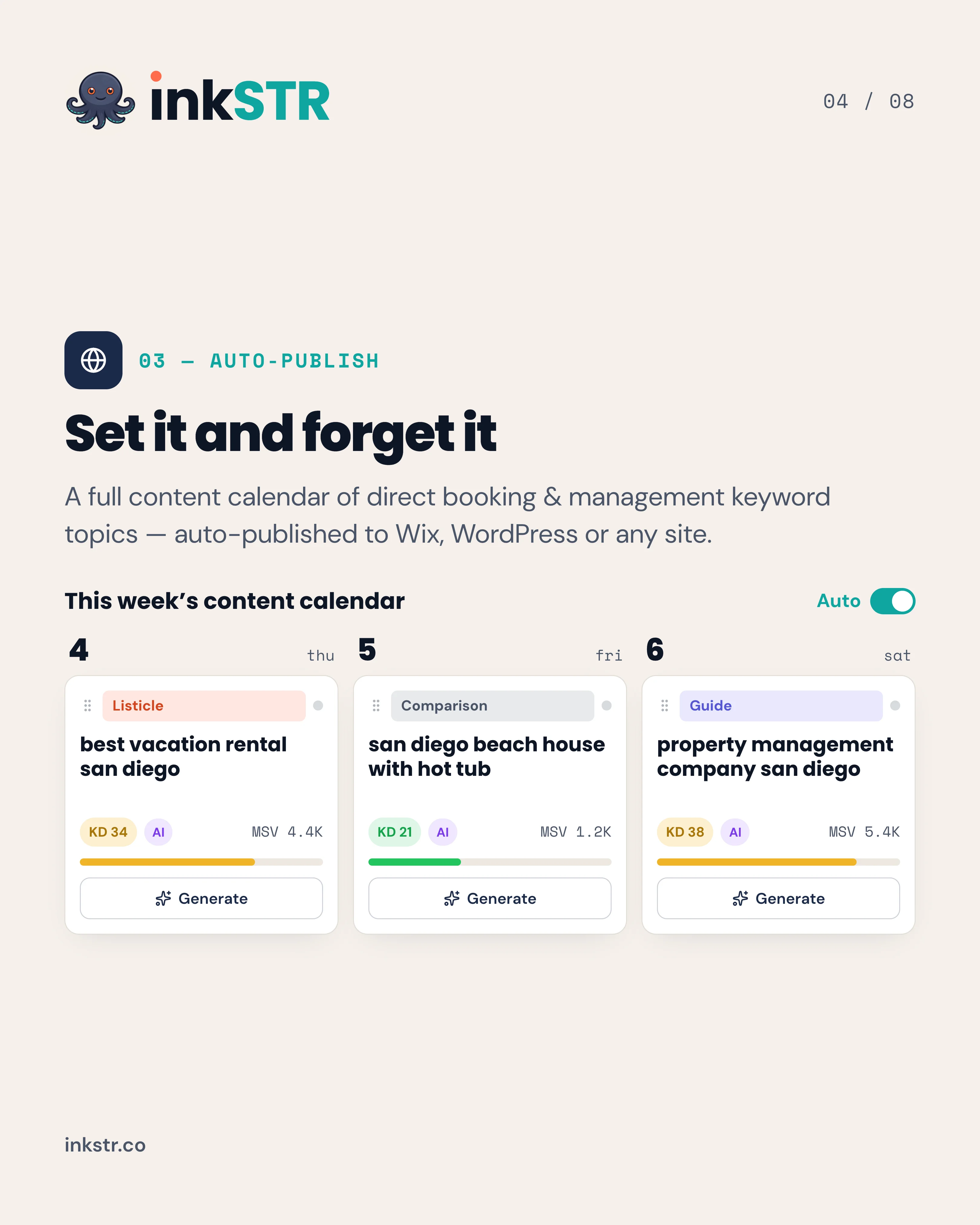
The content calendar is where audit findings become scheduled articles: drag each topic gap to a date and the scheduler publishes it to your site.
Content powered by inkSTR.co
Enjoyed this article? Share it:
Get more of inkSTR in Google Search
Add inkstr.co as a preferred source and our articles show up more in Top Stories, AI Overviews, and AI Mode, with a “Preferred” badge.
Get more guides like this
New SEO and AI-search guides, straight to your inbox. No spam, unsubscribe anytime.